
Launch is just the start: how we make software maintenance as easy as saying it in a group chat
How WeiSAT System keeps post-launch fixes simple — one group per system, owner approval first, backups and checks around every update, and how we take over third-party systems.
For many systems, the real test comes after launch: a field needs changing, a new ticket type is needed, a screen suddenly won’t open. What usually gets in the way then isn’t technology but communication and risk — the problem is hard to describe, nobody knows who to ask, people are afraid a change will break something, and if it does, nobody knows how to roll it back.
WeiSAT System is the service app (with a web version) we provide to our maintenance clients. Here is how we designed it so that “system trouble? just say it in the group” actually holds true.
One system, one group
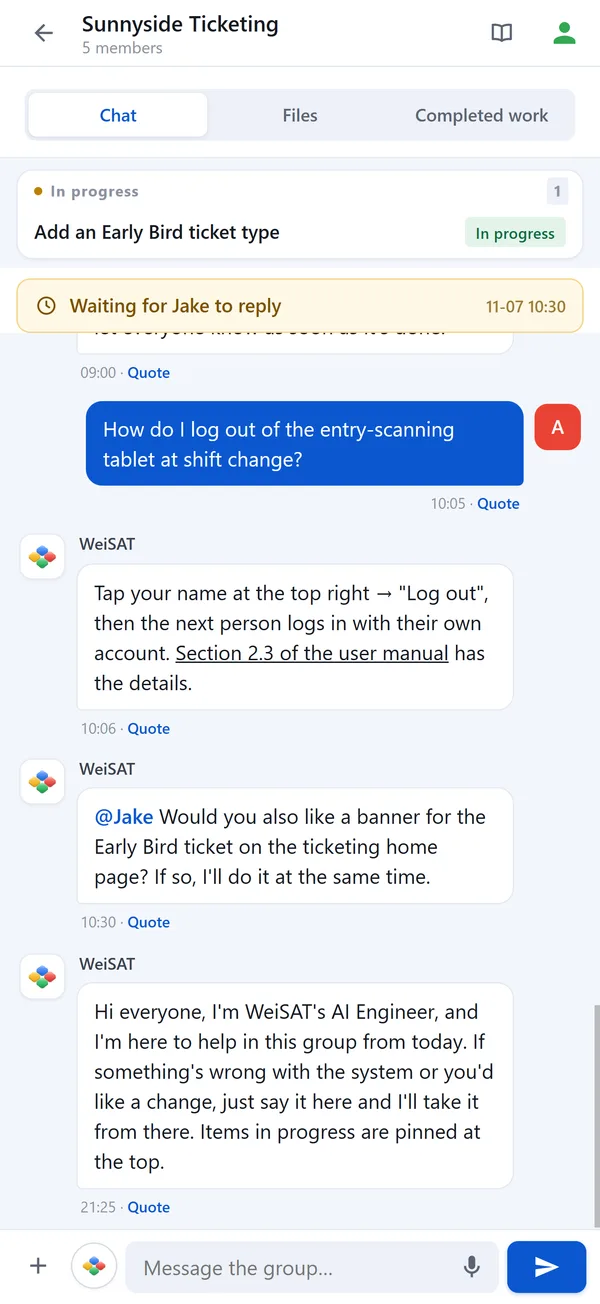
Every system has its own system project group, with the client’s colleagues, partner vendors and WeiSAT all in it. Text, voice, photos and video all work — no more relaying messages one by one, and nothing gets missed.
In-progress items are pinned at the top of the group, so it is always clear who is waiting on whom.
First, pin down what you actually want
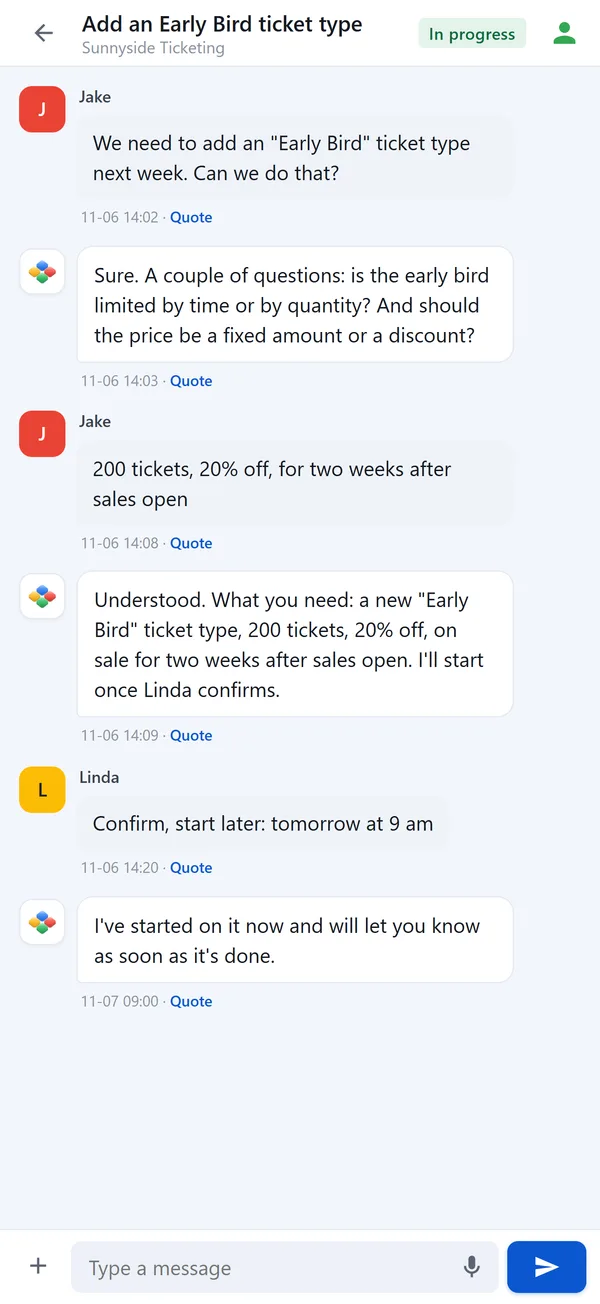
Clients usually describe symptoms: “Can we add an early-bird ticket to the home page?” “The tablet keeps spinning.” Our AI Engineer asks follow-up questions and sums the request up in one line — for example, “You’d like a new early-bird ticket type, with the early-bird price shown on the home page” — and work only starts once the project owner approves.
It looks like an extra step, but it saves the most time: a change made in the wrong direction costs more than starting a little later.
Symptoms and causes are often in different places
In the systems we maintain, what the client sees and what is actually wrong are often on different layers. A restaurant says “the robot has stopped”, and it turns out the server’s database connections were exhausted; “the tablet keeps spinning” turns out to be a rate-limiting rule blocking the tablet by mistake.
So every issue is checked in a fixed order: server and data first, then settings, and only then on-site checks such as whether a device is switched on and connected. Once the cause is found, it is handled one of three ways:
- Code or server issues — the AI Engineer fixes the code and updates the system.
- Settings or usage issues — we walk the client through it step by step using the user manual, or make the change and ask the client to confirm.
- Hands-on work on site (wiring, measuring, replacing hardware) — arranged and handled by an SE engineer.
Back up before, check after
The worst thing in maintenance is fixing one thing and breaking another. Our rules:
- Once a fix is ready, the client picks when it goes live; if they don’t choose within 24 hours, it updates automatically.
- Back up before every update and tag the current version as a rollback point.
- Check automatically after the update that the service is healthy and the version is right.
- If anything is wrong, restore the previous version immediately — no waiting.
- When it’s done, the client is asked to try it, and the item is closed once they confirm (no reply within 24 hours counts as done). The completion note is filed under “Completed work” and can be looked up any time.
A user manual for every system
Many “problems” are really “I’m not sure how to do this”. Every system has a user manual that can be searched and downloaded as a PDF, and it is updated when the system changes. The manual is also what we use to guide clients: if a step is in the manual, we can walk them through it; if it isn’t, it gets added first.
Systems we didn’t build? We can take them on
Software and platforms built by third parties can be handed to us too. Before taking one over, we do a few things first:
- Take stock — where the source code is, how it is deployed, which version is live, and which databases and external services it uses.
- Gather what’s scattered — deployment scripts and settings that only exist on one person’s computer go into version control and backups.
- Add safety and rollback — passwords and keys come out of the code, and deployments are tagged with versions and can be rolled back in one step.
- Write a maintenance guide — what to check first for common issues, the likely causes, and who handles what, so every future fix has a starting point.
Once we’ve confirmed we can take it on, it is maintained in WeiSAT System just like the systems we built ourselves.
New features or a new project
Use “New project” in the app and describe it in your own words. The AI asks one question at a time and turns the answers into a project outline for the owner to approve before anything goes further.
Getting started
WeiSAT System is for WeiSAT maintenance clients and the colleagues and vendors they invite; an invitation is required to sign up. The app is available on the App Store and Google Play, and there is a web version too, in Traditional Chinese, Simplified Chinese, English and Japanese.
For more details and screens, see WeiSAT System.